
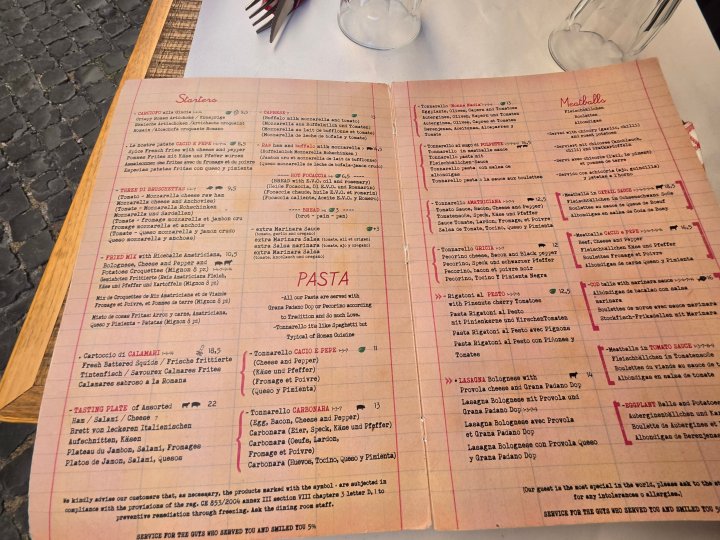
Photo credit: Cestujlevne (cestujlevne.com)
A tourist sits down at your restaurant, opens the menu, and their face goes blank. They cannot read a word of it. In 2026, that confusion is completely avoidable — AI menu translation tools for restaurants can turn any menu into a perfectly readable, multilingual experience in seconds. Whether you run a trattoria in Rome, a taco stand in Mexico City, or a fine-dining spot in Dubai that serves guests from forty countries, AI translation has become the cheapest way to welcome foreign diners and win their business.
This guide explains what AI menu translation tools for restaurants actually do, compares the best options available in 2026, and gives you a practical rollout plan — including the accuracy pitfalls (allergen information, dish names) you must handle before going live.
Why menus get lost in translation
A restaurant menu is one of the hardest documents to translate. Dish names are cultural ("osso buco", "bibimbap", "moussaka"), descriptions use poetic language, and abbreviations are everywhere. A generic translation that turns "black pudding" into something alarming — or worse, mistranslates an allergen warning — can ruin a meal or create a genuine health risk.
Traditional approaches all have problems: printed multilingual menus go stale the moment you change a dish or a price; hiring a translator for every seasonal update is expensive; and asking bilingual staff to translate on the spot is inconsistent. AI menu translation tools solve the staleness problem because the translation updates automatically whenever the source menu changes.
What AI menu translation tools for restaurants actually do
Modern AI menu translation tools for restaurants combine three technologies:
- Optical character recognition (OCR): the tool photographs or scans your printed menu and reads the text, including stylized fonts and layouts.
- Neural machine translation: large language models translate the text while preserving tone and context — not word-by-word, but meaning-by-meaning.
- Menu-aware formatting: the better tools keep your menu's structure — sections, dish names, prices, dietary icons — so the translated version looks like a menu, not a spreadsheet.
The typical workflow: you upload a photo or PDF of your menu once, pick your target languages, review the translation, and publish it as a QR-code menu, a web page, or a printed insert. When you update the source menu, most tools re-translate only what changed.
The best AI menu translation tools for restaurants in 2026
1. Google Translate (with Camera/Lens mode)
The free baseline every restaurant should know. Point a phone camera at any menu and Google Translate overlays the translation in real time, in 130+ languages. It is not menu-specific — it will not preserve your layout — but for walk-in tourists it is instant and free. Many restaurants now print a small table card saying "Point your camera here — we support Google Translate," which costs nothing and immediately helps foreign guests.
Price: Free. Best for: restaurants that want a zero-cost, zero-setup option today.
2. DeepL
DeepL consistently produces the most natural-sounding translations of any mainstream engine, particularly for European language pairs. It is text-based rather than camera-based, so the workflow is: export your menu text, translate, and lay it out. The paid plans add glossary control — you can lock in how specific dish names and terms are always translated, which is exactly what a restaurant needs for consistency across seasonal menus.
Price: Free tier; Pro from around $8/month. Best for: restaurants that want the highest translation quality for printed multilingual menus.
3. Microsoft Translator
Strong for group and conversation scenarios: the conversation mode lets a server and a guest each speak their own language while the app translates both ways. Useful beyond the menu — for explaining specials, handling dietary questions, and taking orders from guests who share no common language with your staff.
Price: Free app; API billed per character for business integrations. Best for: front-of-house communication, not just the printed menu.
4. Papago (Naver)
If your restaurant serves Korean, Japanese, or Chinese tourists — or you are a restaurant in East Asia serving Western tourists — Papago outperforms the general engines on those language pairs. Camera translation, text translation, and a solid offline mode make it practical at the table.
Price: Free. Best for: restaurants with heavy East Asian tourist traffic.
5. iTranslate
A polished camera + voice + text translator with offline language packs. The offline mode matters: tourists often have no data roaming, so a translation experience that works without connectivity keeps the table happy. The Pro version removes ads and unlocks offline packs.
Price: Free tier; Pro $12.99/month (or $99.99/year) per the App Store listing. Best for: tourist-heavy locations where guests may be offline.
6. MenuGuide
One of the few apps built specifically for restaurant menus rather than general translation. It is designed around the diner's side of the experience — scanning a menu and understanding it — and it illustrates the direction the category is moving: purpose-built menu apps instead of generic translators. Worth testing if your clientele skews heavily tourist.
Price: Free app. Best for: restaurants in tourist districts testing a menu-specific approach.
7. SayHi Translate
Voice-first translation with a simple interface: hold a button, speak, and it speaks back the translation. Less useful for the printed menu itself, but excellent for the human moments around the meal — explaining the dish of the day, confirming an allergy, or chatting with guests.
Price: Free. Best for: spoken communication between staff and foreign guests.
Comparison: AI menu translation tools for restaurants
| Tool | Type | Languages | Offline mode | Price | Best for |
|---|---|---|---|---|---|
| Google Translate | Camera + text + voice | 130+ | Yes | Free | Zero-cost instant option |
| DeepL | Text (glossary control) | 30+ | No | Free / from ~$8/mo | Highest-quality printed menus |
| Microsoft Translator | Conversation + text | 100+ | Yes | Free app | Staff–guest conversations |
| Papago | Camera + text + voice | 13 | Yes | Free | East Asian language pairs |
| iTranslate | Camera + voice + text | 100+ | Yes (Pro) | Free / ~$5–7/mo | Offline tourist locations |
| MenuGuide | Menu-specific app | Varies | Varies | Free | Tourist-district restaurants |
| SayHi Translate | Voice-first | 100+ | No | Free | Spoken table-side help |
How to roll out menu translation in your restaurant: a 5-step plan
Step 1 — Pick your languages from real data. Check your reservation system, POS, or simply ask staff: which nationalities actually walk through your door? Translating into the three languages your guests speak beats translating into twenty nobody reads.
Step 2 — Start with the free camera option. Put a small card on each table explaining that guests can point Google Translate at the menu. This takes ten minutes and immediately helps.
Step 3 — Build your glossary. List every dish name, ingredient, and dietary term, and decide the approved translation for each. Feed this into DeepL's glossary (or keep it as a reference sheet). This is the single highest-value step: it guarantees "your" dishes always read the same way.
Step 4 — Produce the translated menus. Translate the full menu text with DeepL or a professional review pass, lay it out to match your branding, and publish via QR code plus a few printed copies. If you run AI-assisted menu engineering and pricing, keep the translated versions in the same update workflow so prices never drift between languages.
Step 5 — Train staff on the conversation tools. Show your team Microsoft Translator's conversation mode or SayHi for the moments a translated menu cannot cover — daily specials, allergy questions, and wine recommendations.
Accuracy pitfalls you must handle
Allergen information is safety-critical. Never rely on raw machine translation for allergen declarations. Have a bilingual speaker or professional verify every allergen line, in every language, before it reaches guests. This is the one part of the menu where "good enough" AI is not good enough.
Dish names are cultural, not literal. "Sweetbreads" are not sweet bread; a literal translation can disgust or confuse. Your glossary should decide, dish by dish, whether to translate, transliterate, or keep the original name with a translated description.
Prices and formatting drift. When you reprint or update, re-verify that prices match across all language versions. A mismatch between the English and Arabic menu is a trust problem.
Right-to-left languages need layout work. Arabic, Hebrew, and Urdu translations need mirrored layouts, not just translated text. Budget design time for these versions.
What does it cost?
A realistic budget for a single-location restaurant: $0 if you use only free camera translation with table cards; roughly $100–300 one-time if you produce professionally reviewed printed translations for 2–3 languages; and $10–30/month if you add glossary-controlled tools like DeepL Pro for ongoing seasonal updates. Compared to reprinting multilingual menus every season — or losing tourist tables to the restaurant next door — the return is straightforward.
QR-code menus vs. printed multilingual menus
Restaurants usually land on one of two formats, and the right choice depends on your concept. QR-code translated menus cost almost nothing to update: change the source text once and every language version refreshes instantly. They also let you offer ten languages without cluttering the table. The downside is friction — some guests dislike scanning codes, and an older clientele may prefer paper.
Printed multilingual inserts feel premium and work without phones or connectivity, but every price change means a reprint. A practical middle ground many tourist restaurants use: one beautifully printed bilingual menu (local language + English) on the table, plus a QR code offering eight more languages. You get the premium feel where it counts and unlimited language coverage where it is cheap.
If your restaurant takes online orders or reservations, do not forget the website. Tools like Weglot or TranslatePress auto-translate your entire site — including the online menu — into 100+ languages with a language switcher. A tourist who finds your Arabic or Russian menu on Google is a tourist who books a table instead of scrolling past.
Measuring whether it is working
Translation is an investment, so track the return. Three simple metrics tell the story: (1) QR scan rate — what share of tables opens the translated menu (your QR provider's analytics show this); (2) foreign-guest spend — compare average checks from tourist-heavy periods before and after rollout; (3) review mentions — search your Google and TripAdvisor reviews for words like "menu," "English," or "translation" and watch sentiment shift.
Restaurants in tourist districts commonly report that simply making the menu readable lifts tourist table turnover: guests decide faster, order more confidently, and ask staff fewer clarification questions. When the menu stops being a puzzle, the meal starts sooner — and dessert gets ordered more often.
Frequently asked questions
Can AI translate my restaurant menu accurately?
For general dish descriptions, today's AI translation is very good — especially with glossary control. For allergen information and culturally specific dish names, always add a human review pass. Think of AI as doing 90% of the work and a bilingual checker doing the critical 10%.
What is the best free AI menu translation tool for restaurants?
Google Translate's camera mode is the best free starting point: instant, 130+ languages, and zero setup. For higher-quality written translations, DeepL's free tier is the strongest option.
How do tourists use translated menus in practice?
Most commonly through a QR code on the table that opens a translated web menu, or by pointing their phone camera at the printed menu. A small instructional card on the table dramatically increases usage.
Should I translate dish names or keep them original?
Best practice: keep the original dish name and add a translated description underneath. This preserves your branding and authenticity while making the dish understandable — "Osso Buco — slow-braised veal shank with saffron risotto."
Do AI menu translation tools work offline?
Some do. Google Translate, Papago, and iTranslate (Pro) offer offline language packs, which matters in locations where tourists lack mobile data. Web-based tools like DeepL need connectivity.
How often should I update translated menus?
Every time the source menu changes — same day. Stale translations with wrong prices erode trust. This is why glossary-controlled tools beat one-off human translations for seasonal menus: updates take minutes.
Conclusion
AI menu translation tools for restaurants have crossed the line from novelty to necessity in tourist-facing dining. Start free with camera translation and table cards, build a glossary of your dishes, and graduate to professionally reviewed multilingual menus as the foreign-guest revenue justifies it. The restaurants winning tourist business in 2026 are not the ones with the fanciest food photography — they are the ones whose menus every guest can actually read. If you are modernizing the rest of your operation too, explore our broader guide to AI tools for restaurants, our breakdown of AI chatbots for restaurant reservations, and how cloud kitchens use AI to run leaner operations.